
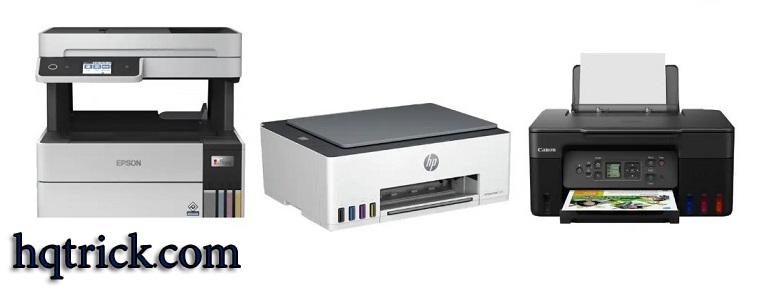
If you print regularly at home or in a small office, cartridges can become the most expensive part of owning a printer.
That is exactly where an ink tank multifunction printer makes sense. Instead of replacing small cartridges, these printers use refillable reservoirs that hold much more ink while still combining printing, scanning, copying, and—in some models—faxing.
But buying the right one is not simply a matter of choosing the printer with the biggest advertised page yield.
The features that affect everyday use much more are automatic duplex printing, an automatic document feeder, paper capacity, print speed, photo quality, and how easy the printer is to maintain.
This HQTrick guide focuses on those differences so you can choose the right type of ink tank printer instead of paying for features you will never use.
HQ Quick Trick: If you print color documents every week, an ink tank printer can make excellent financial sense. If you print only a few black-and-white pages every couple of months, a monochrome laser printer may actually be the simpler choice.
The Short Version: Which Ink Tank Printer Fits You?
| Printer | Best for | Why it stands out | Main compromise |
|---|---|---|---|
| Epson EcoTank ET-4950 | Most home offices | ADF, duplex features, large paper tray, fax | Higher upfront price |
| Canon PIXMA G3270 | Budget home use | Low running costs, simple design, good everyday color printing | No automatic duplex or ADF |
| Canon MAXIFY GX2020 | Document-heavy home offices | ADF, fax, auto duplex, strong paper handling | More office-focused than photo-focused |
| Epson EcoTank ET-8550 | Photos and creative work | Six-color ink and wide-format borderless printing | Expensive if you only print documents |
Model names and availability can vary by country, so use these recommendations as a guide to the feature set you need as well as the exact model.
What Is an Ink Tank Multifunction Printer?
An ink tank printer is still an inkjet printer. The difference is how the ink is stored.
Traditional inkjet printers normally use small replaceable cartridges. Tank printers use larger refillable reservoirs that you top up from bottles.
A multifunction model combines several devices into one machine. Print, scan and copy are standard. Some office-oriented models also add faxing, an automatic document feeder, automatic double-sided printing, Ethernet, or more advanced scanning.
The biggest advantage is running cost. Ink bottles hold substantially more ink than typical cartridges, so households and offices that print regularly can go much longer between refills.
The trade-off is the purchase price: tank printers usually cost more upfront.
That means the important question is not simply, “Is an ink tank printer cheaper?”
It is:
Will you print enough for the lower ongoing ink cost to justify the higher purchase price?
Best Overall for a Home Office: Epson EcoTank ET-4950
The Epson EcoTank ET-4950 is one of the most balanced choices for someone who prints regularly but does not need a large business printer.
It is designed around home-office work rather than occasional printing. Its feature set includes an automatic document feeder, a 250-sheet paper tray, automatic two-sided functionality, wireless printing, scanning, copying and faxing.
That combination matters more than it may sound.
If you frequently scan contracts, invoices, school documents or multi-page forms, an automatic document feeder saves far more time than a slightly faster headline printing speed.
The ET-4950 also makes sense for a shared household because its larger paper capacity means less frequent refilling.
If you are putting together a complete home-office setup rather than replacing only the printer, it also helps to think about how the rest of your hardware fits together. Our laptop buying guide explains the CPU, RAM, storage, display and connectivity features worth checking before choosing your main computer.
Who should buy it?
Choose the ET-4950 if you regularly print and scan multi-page documents, want automatic duplex features, and expect the printer to be part of a home office rather than something you use once a month.
Who should skip it?
If you mostly print occasional homework, tickets or a few color pages, you may be paying for office features you do not need.
HQ Verdict: This is the most balanced choice here for a serious home-office setup.
Best Budget Choice: Canon PIXMA G3270
The Canon PIXMA G3270 takes a much simpler approach.
It prints, scans and copies, supports wireless printing, and uses Canon’s refillable MegaTank system. Its high ink capacity makes it much more economical for regular printing than a conventional low-cost cartridge printer.
But its missing features are just as important as its strengths.
There is no automatic document feeder, so every document you scan must be placed manually on the flatbed. Automatic duplex printing is also absent.
That makes the G3270 a better fit for a household than a paperwork-heavy office.
Who should buy it?
It makes sense for families, students and home users who mainly want inexpensive document and color printing with occasional scanning.
Who should skip it?
If you routinely scan ten-page documents or print double-sided reports, the lack of an ADF and automatic duplex printing will become annoying very quickly.
HQ Verdict: Do not pay for office features if you will never use them. For straightforward home printing, simplicity can be an advantage.
Best for Document-Heavy Work: Canon MAXIFY GX2020
The Canon MAXIFY GX2020 is aimed much more directly at office work.
It combines printing, scanning, copying and faxing with automatic double-sided printing, a 250-sheet cassette and an automatic document feeder.
That makes it fundamentally different from basic home tank printers.
If your workload includes invoices, contracts, reports or forms, workflow features matter much more than photo quality. Feeding a stack of documents into the scanner or printing a double-sided report automatically can save several minutes every time you use the machine.
The office-focused design also makes this type of printer particularly suitable for text and business documents.
Who should buy it?
Small offices, freelancers and home-office users who deal with paperwork regularly.
Who should skip it?
Someone primarily interested in high-quality photo printing. There are better printers for that job.
HQ Verdict: Buy for the workflow, not merely for the ink tanks.
Best for Photos and Creative Work: Epson EcoTank ET-8550
Most ink tank printers are designed around ordinary four-color document printing.
The Epson EcoTank ET-8550 is different.
It uses a six-color ink system and can print borderless media up to 13 × 19 inches, making it much better suited to photography, artwork, crafts and other color-sensitive work.
That versatility comes at a price.
For someone printing invoices and school assignments, much of what makes the ET-8550 special would be wasted. But for photographers and creative users who produce a lot of prints, the combination of refillable ink and wide-format photo capability is much more compelling.
Who should buy it?
Photographers, designers, crafters and anyone regularly printing high-quality photos or larger creative projects.
Who should skip it?
Almost everyone whose printing is mainly text.
HQ Verdict: A specialist choice. Excellent when its photo capabilities are genuinely useful, unnecessarily expensive when they are not.
The Feature Most Buyers Forget: The Automatic Document Feeder
Printer marketing tends to focus on ink yield and resolution.
For everyday productivity, an automatic document feeder (ADF) can matter more.
Imagine scanning a 20-page contract.
Without an ADF, you place page one on the scanner, close the lid, scan it, remove it, place page two, and repeat.
With an ADF, you insert the stack and let the printer work through it automatically.
That is why a cheaper printer without an ADF can become the more frustrating purchase even when its ink costs are excellent.
If you scan multi-page documents more than occasionally, consider an ADF a requirement rather than a luxury.
Automatic Duplex Printing Is Worth Paying For
Duplex printing means automatically printing on both sides of the page.
Without it, double-sided printing usually means manually taking the printed stack, flipping it correctly and feeding it through again.
For school, office and business documents, automatic duplex printing saves paper and removes a surprisingly irritating manual step.
Before buying any printer, check the specification carefully.
“Duplex” can refer to printing, scanning or both, and manufacturers do not always implement all three functions in the same model.
Do Not Choose a Printer by Page Yield Alone
Manufacturers often advertise impressive numbers such as thousands of pages from one set of bottles.
Those figures are useful for comparing products, but they are produced under standardized testing conditions.
Your real yield changes depending on what you print.
A text-heavy business document uses very different amounts of ink from a full-page photograph.
So instead of choosing whichever printer advertises the largest number, compare four things:
| What to check | Why it matters |
|---|---|
| Price of replacement ink | Determines long-term operating cost |
| Features you actually use | ADF, duplex, fax and Ethernet can matter daily |
| Paper capacity | Important for frequent printing |
| Replacement and maintenance parts | Determines how easy the printer is to keep running |
HQ Quick Trick: The printer with the cheapest ink is not automatically the cheapest printer to own if it wastes your time or forces you to replace the entire machine when a maintenance component fails.
Ink Tank vs Cartridge Printer: Which One Actually Saves Money?
Tank printers make the most sense for people who print regularly.
A conventional cartridge printer can still be reasonable when the printer itself is inexpensive and printing volume is extremely low.
The problem begins when a cheap cartridge printer becomes a high-volume printer. The hardware was inexpensive, but repeated cartridge purchases can quickly erase that initial saving.
Tank systems reverse the economics: more money upfront, much less dependence on small replacement cartridges afterward.
For families, students and home businesses that print every week, that trade can be attractive.
Ink Tank vs Laser Printer
This decision is more interesting.
Choose an ink tank printer when color output is important and you print enough to benefit from refillable ink.
A laser printer can be a better fit when almost everything you print is black text, speed matters more than color quality, or the printer may sit unused for long periods.
Ink tank machines are still inkjet printers, so they have printheads and liquid ink. Laser printers use toner instead.
There is no universal winner.
The right technology depends on what comes out of the printer most often.
What About Wireless Printing?
Wireless printing is convenient, but your printer is still another network-connected device.
Keep its firmware updated, protect its administrator settings, and secure your home Wi-Fi network with a strong password and modern encryption.
This matters especially if the printer supports remote access, cloud printing or mobile apps.
If the printer offers internet-connected features you never use, consider disabling them. A printer does not need unrestricted exposure to online services simply because it supports Wi-Fi.
HQ Quick Trick: After installing a new wireless printer, change any default administrator credentials and check for firmware updates before relying on it for everyday use.
Building a Better Home-Office Setup
A printer rarely works in isolation.
For a home office, you should think about the entire setup: the computer, router, printer, storage and peripherals all need to work together.
For example, a printer with fast wireless networking is less useful if the computer you use every day lacks the ports, performance or connectivity your workflow requires.
If you are upgrading more than just the printer, our laptop buying guide can help you compare the hardware features that actually matter before buying.
Likewise, if your printer, laptop and other smart devices all depend on Wi-Fi, taking a few minutes to secure your home Wi-Fi network protects the whole setup rather than just one device.
Five Questions to Ask Before You Buy
Before choosing an ink tank multifunction printer, answer these questions:
How much do I actually print?
Regular printing makes the economics of an ink tank system much more attractive.
Do I scan multi-page documents?
If yes, prioritize an automatic document feeder.
Do I frequently print on both sides?
Look specifically for automatic duplex printing.
Are photos important?
A basic four-color office printer and a six-color photo printer serve very different purposes.
What happens when the printer needs maintenance?
Check whether maintenance boxes, waste-ink components and printheads are user-replaceable and whether replacement ink is readily available in your country.
These five questions will narrow the market more effectively than comparing twenty nearly identical specification sheets.
Frequently Asked Questions
Are ink tank printers cheaper to run?
Usually, for people who print regularly. Refillable bottles provide far more ink than typical cartridges, which can substantially reduce the cost of ink over time.
The printer itself normally costs more upfront, so very light users may take longer to recover that difference.
Are ink tank printers good for home use?
Yes, particularly for households that regularly print schoolwork, documents or color pages.
A simpler model without an ADF may be enough for casual home use.
What is the best ink tank multifunction printer for a home office?
A model such as the Epson EcoTank ET-4950 provides a strong combination of refillable ink, an automatic document feeder, a larger paper tray, duplex features and faxing.
The right choice still depends on whether you need those office functions.
Is Epson EcoTank better than Canon MegaTank?
Neither brand is automatically better.
Epson and Canon both offer everything from basic home printers to higher-end office and photo models.
Compare specific models based on ADF capability, duplex printing, paper handling, ink type and local ink availability rather than choosing by brand alone.
Do ink tank printers dry out?
They use liquid ink and printheads, so long periods without printing can create maintenance issues that laser printers do not face in the same way.
If you print extremely rarely and mostly need black text, a laser printer may be a better fit.
Should I buy an ink tank printer with an ADF?
If you regularly scan or copy multi-page documents, yes.
For many office users, the ADF is one of the most useful features on the entire machine.
Final Verdict
The smartest way to choose an ink tank multifunction printer is to ignore the biggest marketing number on the box and focus on how you will actually use it.
For a productive home office, the Epson EcoTank ET-4950 offers the most balanced feature set.
For straightforward home printing at a lower entry point, the Canon PIXMA G3270 keeps things simple.
For document-heavy work, the Canon MAXIFY GX2020 adds the workflow features that matter.
And for photography and creative printing, the Epson EcoTank ET-8550 is built for an entirely different level of color and media flexibility.
The real trick is not buying the printer with the most features.
It is buying the cheapest printer that has every feature you will actually use—and none you are paying for just because it looks good on the box.