
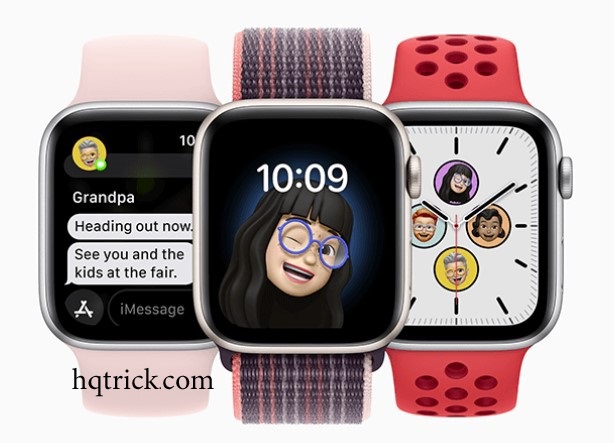
The Apple Watch Series 8 was released in 2022, which makes it old by smartwatch standards—but that does not automatically make it a bad buy.
Used and refurbished Series 8 watches are still widely available, and the hardware includes several features that remain genuinely useful: an Always-On display, ECG capability, temperature sensing, Crash Detection, fast charging and solid fitness tracking.
But there is now one major reason to think carefully before buying one:
Apple Watch Series 8 is no longer supported by the latest watchOS generation.
Apple’s current watchOS 27 requires Apple Watch Series 9 or later, Apple Watch SE 3, or Apple Watch Ultra 2 or later.
That changes the buying decision significantly.
The Series 8 can still be useful, but in 2026 it should be treated as an older discounted smartwatch, not as a cheaper equivalent to a current Apple Watch.
HQ Quick Trick: Do not buy a Series 8 simply because the price looks cheap. Compare it with the cheapest Series 9-or-newer model you can find first. Software support is now one of the biggest differences.
Apple Watch Series 8 at a Glance
The Series 8 was introduced in September 2022 and came in 41mm and 45mm case sizes.
Its main specifications include:
| Feature | Apple Watch Series 8 |
|---|---|
| Display | Always-On Retina OLED |
| Brightness | Up to 1,000 nits |
| Case sizes | 41mm / 45mm |
| Chip | S8 SiP |
| Storage | 32GB |
| Battery rating | Up to 18 hours |
| Water resistance | WR50 |
| Dust resistance | IP6X |
| ECG | Yes, where supported |
| Blood Oxygen sensor | Yes, availability varies |
| Temperature sensing | Yes |
| Crash Detection | Yes |
| GPS | Yes |
| Cellular option | Yes |
| Fast charging | Yes |
| Latest watchOS 27 support | No |
Apple’s original technical specifications are still available on the official Apple Support page.
The Biggest Problem in 2026: Software Support
This is now the most important part of the entire buying guide.
Apple Watch Series 8 does not support watchOS 27.
Apple currently lists the following as compatible with watchOS 27:
- Apple Watch Series 9 and later
- Apple Watch SE 3
- Apple Watch Ultra 2 and later
That means the Series 8 has crossed an important line in its lifecycle.
It may continue working perfectly well with the software it supports, but buyers should no longer expect it to receive the same major operating-system features as current Apple Watches.
Why does that matter?
Over time, newer watchOS releases can bring:
- New health and fitness features
- Interface changes
- New apps
- Improvements to existing apps
- Better integration with newer iPhones
- New Siri and intelligence features
- Security and compatibility improvements
Not receiving the newest watchOS does not suddenly make a Series 8 useless.
But it does reduce its long-term value.
HQ Verdict: In 2026, software support matters more than almost any small hardware difference between Series 8 and newer generations.
What Is Still Good About the Apple Watch Series 8?
There is a reason the watch remains attractive on the second-hand market.
Its core hardware is still capable.
The Always-On Display Is Still Excellent
The Series 8 uses an Always-On Retina OLED display with up to 1,000 nits of brightness.
For everyday use, it still looks modern.
Notifications are easy to read, workout information is clearly visible, and you do not need to raise your wrist every time you want to check the time.
Unless you compare it directly with much newer hardware, the screen does not make the Series 8 feel particularly ancient.
Health and Fitness Features Remain Useful
The Series 8 includes several sensors that cheaper Apple Watch models historically lacked.
Depending on your country and feature availability, these include:
- ECG
- Blood oxygen sensing
- Heart-rate monitoring
- Wrist-temperature sensing
- Cycle Tracking features
- Fall Detection
- Crash Detection
- Sleep tracking
- Workout tracking
That is still a strong set of capabilities.
However, there is an important distinction:
Having the hardware sensor does not guarantee every health feature will be available in every country or remain identical across software versions.
Health features can depend on local regulatory approval, software version and region.
If health and fitness tracking are your main reason for buying a wearable, also compare the Series 8 against the options in our guide to health and fitness wearables before deciding.
Crash Detection Still Adds Real Value
Series 8 introduced Apple’s Crash Detection capability alongside that generation’s other devices.
Using its motion sensors and other data, the watch can detect certain severe car crashes and attempt to contact emergency services when needed.
It is the kind of feature you hope never to use, but it remains one of the more meaningful safety additions in the Series 8 generation.
Fast Charging Makes the Battery Easier to Live With
The Series 8 is rated for up to 18 hours of normal use.
That is not impressive by modern fitness-watch standards, and anyone who dislikes frequent charging should consider alternatives.
But fast charging makes the limitation easier to manage.
A short charge while showering or getting ready can often fit more naturally into a daily routine than leaving the watch on a charger overnight.
This becomes especially important if you want to use sleep tracking.
A watch cannot track your sleep while it is sitting on your nightstand charging.
Where the Series 8 Now Feels Old
The problem is not that any one specification is terrible.
The problem is that newer Apple Watches have continued moving forward while Series 8 has stopped receiving the newest OS generation.
No watchOS 27
This is the biggest disadvantage.
Older processor platform
The S8 remains adequate for common watch tasks, but current Apple Watches use newer silicon and support software features unavailable to Series 8.
Older health platform
Apple’s newest Series 12 generation introduced a newer Health Sensing System and additional health and fitness capabilities that the Series 8 hardware cannot reproduce.
Limited remaining software life
Because Series 8 has already fallen off the latest major watchOS compatibility list, its useful software lifespan is inherently shorter than a Series 9-or-newer purchase today.
Apple Watch Series 8 vs Series 9: The Most Important Comparison
If you are shopping used or refurbished, this is arguably the comparison that matters most.
The Series 9 may not look dramatically different at first glance, but in 2026 it has one enormous advantage:
Series 9 supports watchOS 27. Series 8 does not.
That makes Series 9 the practical dividing line I would use when comparing older Apple Watches.
If the price difference between a Series 8 and Series 9 is small, the Series 9 is generally the more sensible long-term purchase because it remains inside Apple’s current software-support window.
The Series 8 becomes interesting when the discount is substantial enough to compensate for its shorter remaining software life.
What About Buying a Newer Apple Watch Instead?
Apple’s current mainstream generation is now the Apple Watch Series 12, launched in September 2026.
That means Series 8 is four mainstream generations behind the current model.
You do not necessarily need a Series 12.
Previous generations can offer excellent value.
But this is exactly why you should not compare:
Used Series 8 vs brand-new Series 12
and conclude that the Series 8 is a bargain simply because the price difference is huge.
Instead compare:
Series 8 vs Series 9 vs Series 10 vs Series 11
at the actual prices available to you.
The best value often sits somewhere between the oldest cheap model and the newest expensive model.
For a broader way of comparing watches across brands and generations, read our smartwatch buying guide.
When an Apple Watch Series 8 Still Makes Sense
There are circumstances where buying one remains reasonable.
You Find One at a Very Good Price
Price is now the Series 8’s main advantage.
A heavily discounted Series 8 can still provide notifications, Apple Pay, workouts, GPS, health tracking and the familiar Apple Watch experience.
But the discount should be meaningful.
If spending a little more gets you a Series 9 with current watchOS support, saving a small amount on the Series 8 is difficult to justify.
You Only Need Basic Apple Watch Features
Maybe you mainly want:
- Notifications
- Timers
- Calls
- Apple Pay
- Activity tracking
- Heart-rate data
- Basic workouts
- Sleep tracking
The Series 8 can still perform these core functions well.
Not everyone needs the newest AI, health or performance features.
You Plan to Keep It for a Shorter Period
If you want an inexpensive Apple Watch for a year or two rather than a long-term purchase, an affordable Series 8 becomes easier to justify.
For someone hoping to keep the watch for four or five years, starting with newer hardware makes much more sense.
When You Should Skip the Series 8
There are also situations where I would move directly to a newer generation.
You Want Long Software Support
Choose Series 9 or newer.
That is the clearest answer.
The Price Is Close to a Series 9
The software-support difference is too important to ignore for a small saving.
You Want the Newest Health Features
Newer Apple Watch generations have moved beyond the Series 8 sensor platform.
You Are Buying a Watch to Keep for Many Years
The newest watch you can reasonably afford usually provides a longer useful software lifespan.
Buying a Used Series 8? Check These Things First
This is where buying an old smartwatch differs from buying one when it was new.
The physical condition matters as much as the specifications.
1. Check Battery Health
Smartwatch batteries wear out.
A Series 8 that has been charged almost every day since 2022 may have significantly less capacity than when new.
On the watch, check:
Settings → Battery → Battery Health
Do not look only at whether the watch turns on.
A worn battery can transform an otherwise good bargain into a frustrating device that needs charging constantly.
Factor potential battery service into the total purchase price.
2. Confirm Activation Lock Is Removed
This is essential.
Never buy a used Apple Watch that remains connected to the previous owner’s Apple Account through Activation Lock.
The seller should unpair the watch properly and remove it from their account.
If Activation Lock remains enabled, you may be unable to activate and use the watch.
HQ Quick Trick: Do not accept “you can remove it later” as an answer. Make sure the watch can actually be paired to your iPhone before completing an in-person purchase.
3. Inspect the Screen Carefully
Check for:
- Deep scratches
- Cracks
- Dead pixels
- Touch-response problems
- Damage around the edges
A scratched case is usually cosmetic.
A damaged display can turn a cheap used watch into an expensive repair.
4. Check the Digital Crown and Side Button
Rotate and press the Digital Crown.
Test the side button.
They should respond reliably without sticking or requiring unusual pressure.
5. Test Charging
If possible, place the watch on a compatible charger before buying it.
Confirm that charging begins normally.
6. Check the Exact Model
Series 8 came in multiple versions:
- 41mm
- 45mm
- GPS
- GPS + Cellular
- Aluminum
- Stainless steel
Do not pay a Cellular-model premium unless you actually need cellular capability and your carrier supports it.
GPS vs Cellular: Which Series 8 Should You Buy?
For most people buying an older Apple Watch, the GPS version is enough.
Your watch can still handle notifications and many connected functions when your iPhone is nearby.
The Cellular model makes more sense if you regularly leave your iPhone behind but still want calls and data access.
Before paying extra for Cellular:
- Check that your carrier supports Apple Watch cellular service.
- Check the monthly service cost.
- Decide whether you genuinely leave your phone behind often enough to use it.
For many buyers, Cellular sounds more useful than it actually turns out to be.
41mm vs 45mm
This decision is mostly about comfort and screen size.
Choose 41mm if:
- You have a smaller wrist.
- You prefer lighter watches.
- Comfort matters more than screen size.
Choose 45mm if:
- You prefer a larger display.
- You frequently interact with notifications or apps.
- Your wrist comfortably supports the larger case.
Do not assume bigger automatically means better.
A smartwatch is something you may wear for 16+ hours every day. Comfort matters.
What About Apple Watch Series 7?
In 2023, comparing the Series 8 with Series 7 made perfect sense.
In 2026, that comparison is much less useful.
Both are now older generations, and buying even further back only shortens your remaining software and hardware lifespan.
Unless a Series 7 is extraordinarily cheap and your requirements are minimal, I would focus your search on Series 8 or—preferably—Series 9 and newer.
What About Apple Watch SE?
The SE line targets a different buyer.
It usually removes some premium display and health features in exchange for a lower price and newer hardware.
That creates an interesting decision:
Older premium watch vs newer budget watch.
Do not decide only by feature count.
A newer SE with current software support can sometimes be a smarter long-term purchase than an older premium Series model, even if the older watch has more sensors.
A Simple HQTrick Buying Rule
When comparing a Series 8 listing, do this:
Step 1: Find the Series 8 Price
Include shipping, taxes and any expected battery service.
Step 2: Find the Cheapest Good Series 9-or-Newer Alternative
Used, refurbished or new.
Step 3: Compare the Actual Difference
If the newer watch costs only a little more, buy the newer generation.
If the Series 8 is dramatically cheaper and covers everything you need, then it can still be a rational purchase.
That method is much more useful than asking whether the Series 8 is “good” in isolation.
Frequently Asked Questions
Is Apple Watch Series 8 still good in 2026?
For basic smartwatch, fitness and notification features, yes.
Its hardware remains useful.
However, Series 8 no longer supports Apple’s latest watchOS 27, which significantly reduces its appeal as a long-term purchase.
Does Apple Watch Series 8 support watchOS 27?
No.
Apple’s current compatibility list starts with Apple Watch Series 9 for the standard Series line.
Does Apple Watch Series 8 work with iPhone?
Yes, with compatible iPhones and the appropriate supported software versions.
Because compatibility changes over time, check Apple’s current support information before pairing an older watch with a newly released iPhone.
Does Apple Watch Series 8 have an Always-On display?
Yes.
It has an Always-On Retina OLED display rated at up to 1,000 nits.
Does Apple Watch Series 8 have ECG?
The hardware supports Apple’s ECG feature, although health-feature availability can vary by country and region.
Is Apple Watch Series 8 waterproof?
Apple rates Series 8 for water resistance to 50 meters under ISO 22810:2010.
That does not mean it is suitable for every underwater activity, and water resistance can decrease as devices age.
Should I buy Series 8 or Series 9?
In 2026, Series 9 has a major advantage because it remains compatible with watchOS 27.
Series 8 is worth considering mainly when its price is substantially lower.
Is a refurbished Series 8 worth buying?
It can be.
Prioritize battery condition, Activation Lock status, warranty, physical condition and the price difference versus newer supported models.
Final Verdict
The Apple Watch Series 8 is not obsolete, but its role has changed.
In 2023, it was a modern premium smartwatch.
In 2026, it is an older Apple Watch whose value depends almost entirely on price and condition.
The hardware is still capable. The screen is good. The health and fitness features remain useful. Crash Detection and fast charging still matter.
But the loss of watchOS 27 support is the detail that should shape your buying decision.
For most long-term buyers, Series 9 or newer is the better starting point.
For someone who finds a clean Series 8 with a healthy battery at a genuinely low price, however, it can still be a useful entry into the Apple Watch ecosystem.
Before buying, compare it with our complete smartwatch buying guide and, if fitness tracking is your main priority, the best health and fitness wearables guide.
The HQTrick rule: with aging tech, never ask only whether the device still works. Ask whether the saving is large enough to justify the support you are giving up.