
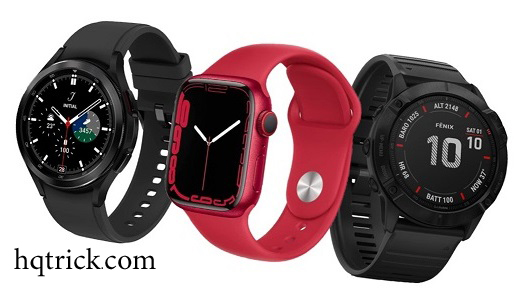
Buying a smartwatch looks simple until you start comparing dozens of models with different operating systems, health sensors, battery claims, case sizes and fitness features.
The easiest way to choose the right watch is not to start with brands.
Start with your phone, your daily routine and the features you will actually use.
A smartwatch that works brilliantly for an iPhone owner may be a poor choice for an Android user. Likewise, someone training for a marathon needs something very different from someone who mainly wants notifications and sleep tracking.
This smartwatch buying guide will help you narrow those choices without paying extra for features that will spend most of their life switched off.
HQ Quick Trick: Choose the ecosystem first, battery requirements second and health or fitness features third. Brand and design should come after those decisions.
Smartwatch, Fitness Watch or Fitness Tracker?
These devices overlap much more than they used to, but the distinction is still useful.
Smartwatch
A smartwatch is essentially a small companion computer for your wrist.
It can usually handle notifications, calls, apps, music controls, contactless payments, GPS, health monitoring and workout tracking.
Apple Watch, Samsung Galaxy Watch and Google Pixel Watch are good examples.
Choose a smartwatch if you want phone-like features as well as fitness tracking.
Fitness Watch
A fitness-focused watch places sports and training ahead of apps and notifications.
These devices often emphasize GPS accuracy, training metrics, navigation, recovery data and long battery life.
They are particularly useful for runners, cyclists, hikers and endurance athletes.
Fitness Tracker
A fitness tracker is generally smaller, simpler and cheaper.
It typically focuses on steps, heart rate, sleep and basic workouts rather than apps and advanced smartwatch functions.
If health and activity data matter more to you than replying to messages from your wrist, a tracker may be all you actually need.
For a deeper comparison of devices focused specifically on health and exercise, see our guide to the best health and fitness wearables.
1. Check Phone Compatibility Before Anything Else
This is the easiest way to eliminate the wrong watches immediately.
If You Have an iPhone
Apple Watch offers the deepest integration with iPhone.
Current Apple Watch models require relatively recent iPhones and iOS versions, and Apple Watch does not operate as a normal Android smartwatch.
That means an iPhone owner considering an Apple Watch should check the exact compatibility of both the watch generation and their iPhone before buying—especially when purchasing an older or refurbished model.
If you are specifically considering an older Series 8, we also have an Apple Watch Series 8 buyer’s guide covering that generation in more detail.
If You Have Android
Android users have considerably more choice.
Samsung’s Galaxy Watch line and Google’s Pixel Watch are among the most integrated Wear OS options.
But compatibility can still vary.
For example, Google states that Pixel Watch does not support iPhone, while different Pixel Watch generations require different minimum Android versions.
Some Samsung health features may also depend on your phone, region or Samsung software.
Do not assume that “Bluetooth compatible” means every watch feature will work with your phone.
Check the manufacturer’s compatibility page before buying.
2. Decide How Much Battery Life You Really Need
Battery life changes the experience of owning a smartwatch more than many specification sheets suggest.
A watch that lasts roughly a day can work perfectly well if charging becomes part of your routine.
But it becomes inconvenient if you want to track both daytime activity and sleep every night.
Broadly, think in three groups:
| Battery expectation | Best suited to |
|---|---|
| Around a day | Full-featured smartwatches and users happy to charge daily |
| Several days | People who want sleep tracking without constant charging |
| A week or more | Fitness-focused users, travelers and people who dislike charging |
Do not compare battery numbers blindly.
Always-on displays, GPS workouts, LTE, sleep tracking and frequent notifications can all reduce real-world runtime.
Samsung, for example, rates current Galaxy Watch9 models for up to around 40 hours with the always-on display disabled, while actual usage will depend on enabled features.
The useful question is not:
Which watch has the longest battery life?
It is:
Can this watch survive my normal routine without changing how I use it?
3. Buy Health Features for a Reason
Modern watches can collect an extraordinary amount of information.
Depending on the device and region, features can include:
- Heart-rate monitoring
- ECG
- Sleep tracking
- Blood oxygen estimates
- Skin temperature
- Fall detection
- Workout recovery metrics
- Menstrual-cycle tracking
- Body-composition estimates
More sensors do not automatically make a watch more useful.
Ask what you actually intend to do with the information.
If your goal is simply to walk more each day, accurate step counting and activity reminders may be enough.
If you are training seriously, GPS quality, heart-rate trends, recovery metrics and workout analysis become much more important.
And remember that consumer wearable health features are not substitutes for professional medical diagnosis.
HQ Quick Trick: A health metric is useful only if it changes a decision. If you never act on your sleep score, recovery score or stress score, paying extra for more metrics adds very little value.
4. Choose Fitness Features Around Your Actual Sport
Most smartwatches can track walking, running and common gym workouts.
The differences appear when your requirements become more specific.
For Running
Prioritize:
- Reliable GPS
- Comfortable weight
- Heart-rate tracking
- Easy-to-read workout screens
- Physical controls if you run in rain or with gloves
- Training and recovery metrics
For Swimming
Check the manufacturer’s actual swimming guidance, not only the words “water resistant.”
A water-resistance rating does not automatically mean every type of water activity is safe.
For Hiking and Outdoor Use
Consider:
- Longer battery life
- Offline maps
- Navigation
- Altimeter
- Compass
- Durable construction
- Emergency or satellite features where available
For Gym Training
GPS matters less.
Comfort, heart-rate monitoring, workout selection and easy controls may matter much more.
Buying an expensive outdoor watch for indoor strength training can mean paying hundreds of dollars for features you rarely touch.
5. Do Not Misunderstand Water Resistance
One of the easiest smartwatch specifications to misunderstand is water resistance.
A watch labeled 5 ATM has been tested against a particular level of water pressure under controlled conditions.
It should not be interpreted simply as:
“I can take this watch 50 meters underwater and do anything I want.”
Swimming, diving, high-speed water sports, hot water, soap and aging seals can place very different stresses on a device.
Before swimming or diving with any smartwatch, check the manufacturer’s instructions for that specific model.
6. GPS: Built-In or Phone-Assisted?
If you regularly run, cycle or hike without carrying your phone, built-in GPS is important.
It allows the watch to record your route independently.
For casual users who nearly always carry their phone, GPS may be less important.
More advanced watches can also use multiple satellite systems or dual-frequency positioning to improve location accuracy in difficult environments such as dense cities or mountains.
Google’s current Pixel Watch 5, for example, supports dual-frequency satellite positioning.
That is useful technology—but not everyone needs to pay for it.
7. Wi-Fi, Bluetooth or LTE?
Many smartwatch families are sold in different connectivity versions.
Bluetooth/Wi-Fi
The standard version normally depends more heavily on your nearby phone or Wi-Fi connection.
For most people, this is enough.
LTE/Cellular
A cellular model can perform more functions away from your phone, such as receiving calls or data when supported by your mobile carrier.
But LTE usually means:
- A more expensive watch
- Possible carrier fees
- Higher battery consumption
- Compatibility requirements with your network
If your phone is almost always in your pocket, think carefully before paying extra for cellular connectivity.
8. NFC Payments Can Be More Useful Than You Expect
Contactless payments are one of those smartwatch features that can become surprisingly convenient.
But support depends on the payment platform, bank and country.
Before buying specifically for NFC payments, check whether your bank works with the watch’s payment service in your region.
A watch having an NFC chip does not guarantee that your cards will work.
9. Screen Size Is Not Just About Looks
Larger screens make notifications, maps and controls easier to read.
Smaller watches are usually lighter and more comfortable on smaller wrists.
If possible, try the watch physically before buying.
Two watches with similar case measurements can feel completely different because of thickness, shape, weight and band design.
For sleep tracking in particular, comfort can matter more than screen size.
A watch packed with excellent sensors is not very useful overnight if you remove it because it feels uncomfortable.
10. Check the Software Ecosystem
Hardware specifications tell only half the story.
The operating system determines:
- Available apps
- Notification controls
- Voice assistants
- Payment services
- Health-data integration
- Watch faces
- Software updates
Current Apple Watches run watchOS, while Samsung and Google use Wear OS-based platforms.
Apple’s newest Series 12 generation uses watchOS 27, and current Pixel and Galaxy watches have similarly evolved far beyond the smartwatch platforms found in the original version of this guide.
This is also why buying a heavily discounted old smartwatch is not always a bargain.
Eventually, old hardware loses major software updates or compatibility with newer phones.
11. Think Carefully Before Buying an Older Smartwatch
Last-generation devices can offer excellent value.
But check four things first:
Software support
Will the watch continue receiving major OS or security updates?
Phone compatibility
Will it pair with your current phone—and likely your next one?
Battery condition
This is especially important with used watches. Lithium-ion batteries deteriorate over time.
Price difference
If the old model costs only slightly less than a much newer one, the saving may not justify losing years of software support.
Our Apple Watch Series 8 buyer’s guide is one example of why generation-specific research matters when considering older hardware.
12. Current Smartwatch Ecosystems at a Glance
You do not need the newest model simply because it exists, but current devices are useful examples of how the main ecosystems differ.
Apple Watch
Best suited to iPhone users who value tight phone integration, a mature app ecosystem and broad smartwatch features.
Apple’s current generation includes the Apple Watch Series 12 and Ultra 4.
Samsung Galaxy Watch
One of the strongest choices for Android users, particularly people already using Samsung phones and Samsung Health.
Current Galaxy Watch9 models combine Wear OS with Samsung’s health platform.
Google Pixel Watch
A natural option for Android users who prefer Google’s software ecosystem and Fitbit-based health integration.
Current Pixel Watch 5 models work with compatible Android phones rather than iPhones.
Fitness-Focused Watches
Brands specializing in running, endurance and outdoor sports may provide substantially longer battery life and deeper training tools than general-purpose smartwatches.
If those areas matter more than apps and phone integration, compare them separately rather than assuming Apple, Samsung or Google is automatically the right choice.
Smartwatch Buying Checklist
Before buying, answer these questions:
1. Does it fully support my phone?
If the answer is uncertain, stop and verify compatibility first.
2. How often am I willing to charge it?
Daily charging and weekly charging create very different ownership experiences.
3. What are the three features I will use most?
Write them down.
If a more expensive model does not improve those three features, you probably do not need it.
4. Do I need LTE?
If your phone is almost always nearby, probably not.
5. Will I actually use advanced health data?
More data is not automatically more useful.
6. What sports do I genuinely do?
Buy for your real activities, not the activities shown in the advertising.
7. How long do I plan to keep the watch?
Software support and battery aging matter much more if you intend to keep it for several years.
The HQTrick Three-Step Method
If all the specifications are becoming confusing, use this simple process.
Step 1: Pick Your Ecosystem
iPhone → start with Apple Watch.
Android → start with Wear OS, Samsung, Google or fitness-focused alternatives.
Step 2: Pick Your Priority
Choose one:
- Smart features
- Fitness
- Health trends
- Battery life
- Outdoor use
- Budget
Step 3: Buy the Cheapest Model That Covers That Priority
Do not buy features because they exist.
Buy them because you know how you will use them.
That one rule can save more money than comparing dozens of specification tables.
Frequently Asked Questions
What should I look for when buying a smartwatch?
Start with phone compatibility, then compare battery life, fitness features, health sensors, size, software support and whether you genuinely need LTE.
Can any smartwatch work with any phone?
No.
Compatibility varies significantly. Apple Watch is designed around iPhone, while Google Pixel Watch supports compatible Android phones and does not support iPhone.
Always verify the specific model before purchasing.
Is it worth paying extra for an LTE smartwatch?
Only if you regularly want to leave your phone behind while remaining connected.
For users who almost always carry their smartphone, the standard Bluetooth/Wi-Fi version often offers better value.
How much battery life should a smartwatch have?
There is no ideal number.
A daily-charge watch can be excellent if that routine suits you. For sleep tracking, travel or endurance sports, multi-day battery life becomes more valuable.
Is a smartwatch better than a fitness tracker?
Not necessarily.
A smartwatch is better for apps, calls, notifications and interaction. A fitness tracker can be cheaper, lighter and better suited to someone who mainly wants activity and sleep data.
Should I buy the newest smartwatch?
Not automatically.
Previous-generation models can offer excellent value when they still receive software support, have a healthy battery and are meaningfully cheaper than the newest version.
Final Verdict
The best smartwatch is not the model with the longest feature list.
It is the one that fits your phone, your wrist and your routine with the least friction.
Start with compatibility.
Then decide how much battery life you need.
Then identify the health, fitness or smart features you will genuinely use.
Everything else is secondary.
If your main goal is detailed exercise or recovery tracking rather than general smartwatch features, compare the best health and fitness wearables before making the final decision.
And if you are considering an older discounted Apple model specifically, our Apple Watch Series 8 buyer’s guide gives you a dedicated starting point.
The HQTrick rule is simple: buy the least expensive watch that solves your real needs—not the most expensive one that gives you features you will forget about after the first week.