
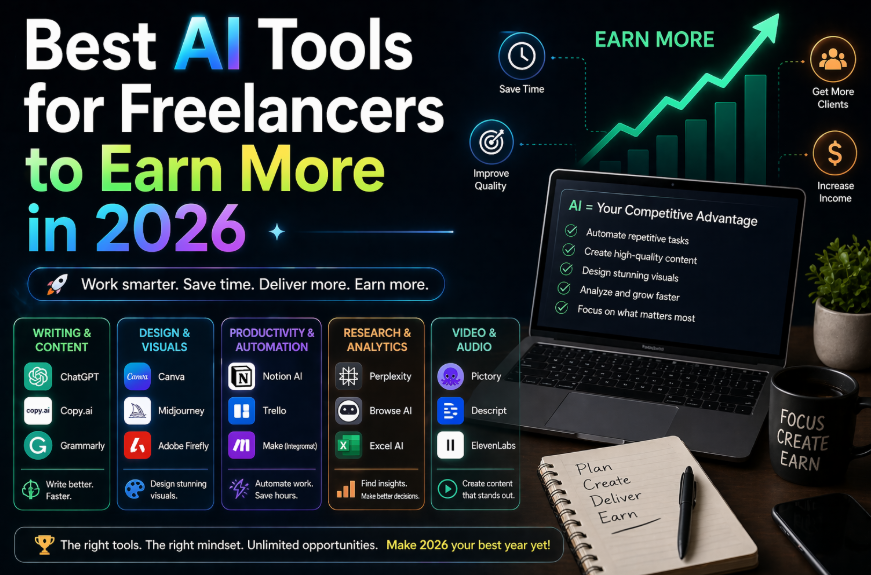
Best AI Tools for Freelancers to Earn More in 2026
The freelance market in 2026 is more competitive than ever — and more opportunity-rich than ever. AI has created an unusual dynamic: the freelancers who adopt it well are dramatically outperforming the market, while those who ignore it are competing against people who can deliver twice the work in half the time.
This guide is for freelancers who want to use AI to do better work faster — and ultimately earn more. These aren’t speculative picks; they’re tools that have measurable impact on freelance income when used consistently.
How AI Actually Helps Freelancers Earn More
Before the tool list, it’s worth being specific about the mechanisms. AI helps freelancers earn more in three distinct ways:
1. Capacity multiplier: AI handles parts of your workflow that don’t require your specific expertise — first drafts, research, formatting, admin. You do more billable work in the same hours.
2. Quality elevator: AI helps you produce work that’s more polished, better structured, and more thoroughly considered — making you more competitive for premium-rate projects.
3. Business operations: Proposals, invoices, client communication, project management — AI handles these so you spend less time on business admin and more time on actual work.
A freelancer who uses AI well can effectively work at 1.5x-2x their previous capacity without burning out. At a $75/hour rate, that’s a significant income difference.
The 9 Best AI Tools for Freelancers in 2026
1. Claude — Best for Writing and Long-Form Work
Best for: Writers, consultants, researchers, strategists
Cost: Free tier available; Pro at $20/month
For freelancers whose work is primarily text-based — writing, analysis, strategy, research — Claude is the highest-impact tool available. The longer context window means you can work with complete project documents, not just snippets. The writing quality is the best of the current generation for tasks requiring nuance and voice.
High-impact use cases:
- First drafts of articles, reports, whitepapers
- Editing and rewriting client content
- Proposal and pitch deck copy
- Research synthesis and executive summaries
2. Jasper AI — Best for Content Marketers
Best for: Content marketing freelancers, copywriters
Cost: From $49/month
Jasper is purpose-built for content marketing use cases and it shows. Where ChatGPT and Claude are general-purpose, Jasper has templates and workflows specifically designed for blog posts, ad copy, email sequences, social posts, and landing pages.
For freelance content marketers, the ROI calculation is straightforward: at $49/month, if Jasper saves you 5 hours per month, you’ve paid for it several times over.
Best feature: Brand Voice — you can train Jasper on examples of a client’s existing content, and it will maintain that voice consistently across all future outputs. This is extremely useful when managing multiple clients with different voices.
3. Copy.ai — Best for Copywriters
Best for: Direct response copywriters, social media managers
Cost: Free tier available; paid from $49/month
Copy.ai specializes in marketing copy — ads, email subject lines, product descriptions, social posts, sales pages. The free plan is genuinely useful for testing whether it fits your workflow. The paid plan unlocks workflows and the ability to create longer-form content.
For freelance copywriters, Copy.ai is most useful as a brainstorming and variation generator — producing 10 headline variations in 30 seconds so you can identify the best direction before writing the full piece.
4. Notion AI — Best for Project Management and Documentation
Best for: All freelancers; especially consultants and project-based workers
Cost: $10/month add-on to Notion
Most freelancers underinvest in their own organizational systems because organizing takes time away from billable work. Notion AI changes this equation by making organization faster than staying disorganized.
Use cases that pay off:
- Client onboarding documents: paste your notes, Notion AI turns them into a structured brief
- Project status updates: give it bullet points, it writes the client-facing update
- Meeting notes: paste the transcript, it extracts action items, decisions, and next steps
- Knowledge base: build a searchable repository of everything you know about your niche
5. Grammarly Business — Best for Professional Polish
Best for: All freelancers who write client-facing content
Cost: Free tier; paid from $12/month
Grammarly remains the highest-ROI low-cost tool for any freelancer. Running client deliverables through Grammarly before submission catches errors that damage your professional reputation and adds a layer of polish that distinguishes your work.
The Business tier adds tone detection and consistency checking — useful for maintaining a client’s specific voice across a long engagement.
6. Descript — Best for Video and Podcast Freelancers
Best for: Video editors, podcast producers, content creators
Cost: Free tier; paid from $24/month
Descript treats audio and video editing like word processing — you edit the transcript, and the audio/video updates automatically. The AI features include:
- Automatic transcription (extremely accurate in 2026)
- Filler word removal (um, uh, you know) in one click
- Eye contact correction for talking-head videos
- AI voice clone for correcting small audio mistakes without re-recording
For video and audio freelancers, Descript typically cuts editing time by 40-60%.
7. Midjourney — Best for Visual Freelancers
Best for: Graphic designers, art directors, visual content creators
Cost: From $10/month
Midjourney has become an essential tool for visual freelancers in 2026 — not to replace their creative judgment, but to dramatically accelerate concept exploration. Generating 20 visual directions for a concept brief takes 10 minutes in Midjourney instead of 2 hours.
The most effective use: use Midjourney for rapid concept exploration, then execute the chosen direction with your full skill set. Clients see more options and get faster turnarounds; you spend your time on execution rather than exploration.
8. Zapier — Best for Automating Business Operations
Best for: All freelancers; especially those with established client bases
Cost: Free for 100 tasks/month; paid from $20/month
Most freelancers lose 3-5 hours per week to business operations: following up on proposals, sending invoices, onboarding new clients, updating project trackers. Zapier automates these workflows without coding.
High-impact automations for freelancers:
- New client signs contract → Send welcome email → Create project folder → Add to client database
- Project completed → Send invoice → Add to accounting spreadsheet
- New inquiry from website → Add to CRM → Schedule follow-up reminder
These automations pay for themselves quickly and eliminate the administrative drag that kills freelance momentum.
9. ChatGPT — Best for Versatile Daily Use
Best for: All freelancers; best general-purpose tool
Cost: Free; Pro at $20/month
ChatGPT remains the most versatile tool in the freelancer’s toolkit — particularly for tasks that don’t fall neatly into any specialized tool’s wheelhouse. Proposal writing, client communication, research, brainstorming, competitor analysis — it handles all of it competently.
The free tier is sufficient for most freelancers. The Pro tier adds more capacity and access to the latest models — worth it if you’re using it heavily.
The Freelancer AI Stack by Budget
Budget: Free only
- ChatGPT (free)
- Grammarly (free)
- Notion (free, no AI features)
Impact: Moderate — handles writing assistance and light organization.
Budget: $30/month
- ChatGPT or Claude ($20/month)
- Notion AI ($10/month)
Impact: Significant — full AI writing capability plus organized workflows.
Budget: $70/month (recommended for serious freelancers)
- Claude Pro ($20/month)
- Notion AI ($10/month)
- Zapier starter ($20/month)
- Grammarly Pro ($12/month)
Impact: Major — end-to-end AI-assisted workflow across writing, organization, and automation.
At a $75/hour freelance rate, $70/month in tools pays back in less than 1 additional hour of work per month. The expected time savings are 3-5 hours per week — making this an obvious investment.
The Most Important Mindset Shift
AI tools don’t make bad freelancers good. They make good freelancers exceptional. The underlying skills — understanding your clients, producing quality work, managing relationships — still determine your ceiling. AI raises it.
The freelancers seeing the biggest income impact from AI are using it to take on more projects (capacity), deliver better outcomes (quality), and spend more time on client relationships (retention). That combination is hard to beat.
Related: [How to Build a Daily Workflow with AI (No Coding Needed)] — build the automation infrastructure that makes these tools work together.
Related Guides on HQTRICK.COM
- [How to Use ChatGPT to Write Emails 10x Faster]
- [Best Free AI Tools for Teachers in 2026]
- [AI Tools for HR Managers That Actually Save Time]
- [5 Claude AI Tricks Most People Don’t Know About]
- [ChatGPT vs Gemini vs Claude: Which AI is Best for Writers?]
- [How to Build a Daily Workflow with AI (No Coding Needed)]
- [Best AI Tools for Freelancers to Earn More in 2026]
- [AI Prompt Tricks That Get 10x Better Results from ChatGPT]
- [How to Replace 5 Hours of Work Daily Using Free AI Tools]