
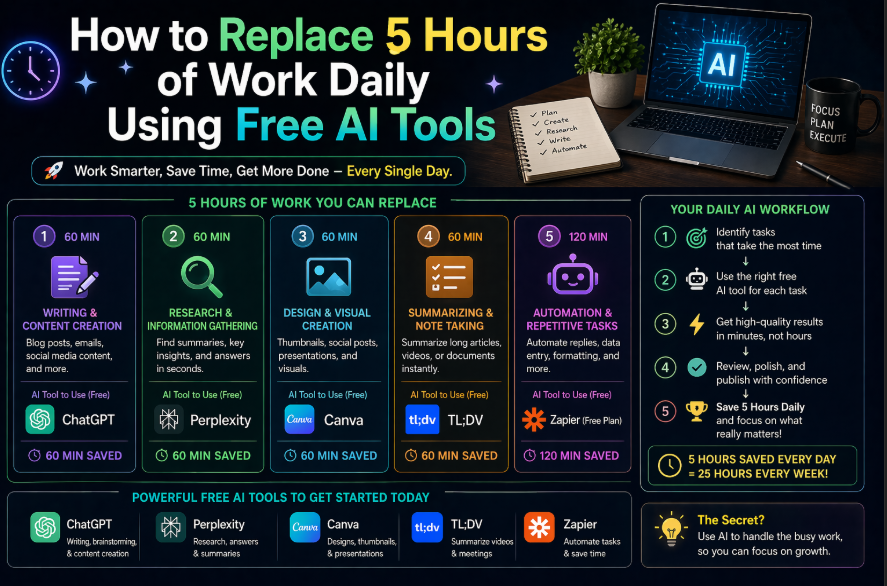
How to Replace 5 Hours of Work Daily Using Free AI Tools
Five hours is a bold claim. But the math works out — and this guide will show you exactly how.
The average knowledge worker spends roughly 8 hours at work. Studies consistently show that 2-3 hours go to email, 1-2 hours go to meetings and meeting prep, 1-2 hours go to administrative tasks, and only 2-3 hours go to what the person was actually hired to do.
AI, used well, can cut the overhead categories dramatically — not by making you rush, but by handling the parts that don’t require your unique judgment, creativity, or relationships.
Here’s how to do it with free tools only.
The 5-Hour Breakdown
Before building the system, let’s be specific about where the hours come from:
| Category | Current Time Spent | With AI | Time Saved |
|---|---|---|---|
| Email writing | 90 min | 20 min | 70 min |
| Meeting prep | 45 min | 10 min | 35 min |
| Meeting follow-up / notes | 30 min | 5 min | 25 min |
| Research and information gathering | 60 min | 15 min | 45 min |
| Report and document drafting | 75 min | 20 min | 55 min |
| Administrative tasks | 45 min | 10 min | 35 min |
| Total | 395 min | 80 min | 315 min (5+ hours) |
These numbers are based on moderate AI use — not aggressive automation, not eliminating review time, not rushing. Just using AI tools for the right tasks.
The Free Tools You Need
All of these have free plans that are sufficient for this system:
ChatGPT (free) — Email drafting, document writing, research synthesis, meeting prep
Claude (free) — Document analysis, long-form writing, editing
Gemini (free) — Real-time research, Google Workspace integration
Notion (free) — Organization, notes, knowledge base
Otter.ai (free) — Meeting transcription (300 minutes/month free)
Grammarly (free) — Final polish on written output
Total cost: $0.
Hour 1: Email (Save 70 Minutes)
Email is where most professionals can reclaim the most time, and where AI is most immediately useful.
The System
Step 1: Batch your email twice a day. Stop checking email continuously. Check at 9am and 3pm only. This isn’t AI, but it’s the foundation that makes AI email management work.
Step 2: Categorize quickly. When you open email, sort into: (a) needs a real response, (b) can be delegated, (c) FYI only, (d) junk. This takes 5 minutes.
Step 3: Draft with ChatGPT. For every email that needs a real response, copy the email, paste it into ChatGPT with this prompt:
“I received this email. Draft a professional reply that [addresses their main question / confirms the meeting / politely declines / asks for clarification on X]. My name is [Name], I’m [Role]. Tone: [professional / warm / direct]. Under [X] words.”
Step 4: Review in 30 seconds. Read the draft. Make any adjustments. Send.
Realistic time: What used to take 3 minutes per email now takes 45 seconds. For 20 emails per day, that’s 2 minutes vs 60 minutes. You’re ahead by nearly an hour.
Bonus: Template Emails
For your most common email types (meeting requests, follow-ups, introductions, status updates), create ChatGPT prompts that work consistently and save them in a Notion doc. Each becomes a 15-second task.
Hour 2: Meeting Prep (Save 35 Minutes)
Preparing for meetings typically involves: researching the people or company, reviewing previous communications, refreshing your memory on context, and preparing questions or agenda points.
The System
Before any external meeting:
Paste the following into ChatGPT or Gemini:
“I have a meeting with [Name] from [Company] in [X] hours. Here’s what I know: [brief context]. Please: 1. Summarize what I should know going into this meeting 2. Suggest 5 smart questions I could ask 3. Flag any potential concerns or topics to be careful about 4. Draft a 3-bullet agenda I could share with them in advance”
For Gemini specifically, add: “Search for any recent news about [Company] and include relevant findings.” Gemini’s web access makes this genuinely useful for up-to-date information.
Time: 5 minutes vs 40 minutes of scattered research and prep.
Hour 3: Meeting Follow-Up (Save 25 Minutes)
Most of the time spent after a meeting goes into: writing up notes, identifying action items, sending follow-up emails to attendees, and updating project trackers.
The System
Step 1: Record the meeting. Use Otter.ai (free, 300 minutes/month) or any recording tool to capture the audio. It transcribes automatically.
Step 2: Paste the transcript into Claude or ChatGPT with this prompt:
“Here is a meeting transcript. Please: 1. Write a 5-bullet summary of the main topics discussed 2. List all action items with the person responsible (format: Action – Owner) 3. List any decisions made 4. Draft a follow-up email to send to all attendees with the summary and action items
Transcript: [paste]”
Step 3: Review the output (2 minutes), make adjustments, send the follow-up email.
Time: 5 minutes vs 30 minutes of manual note-writing and email drafting.
Note: Not all meetings should be recorded — use judgment based on the nature of the conversation and always inform participants.
Hour 4: Research (Save 45 Minutes)
Whether you’re preparing a brief, researching a vendor, staying up to date on your industry, or gathering competitive intelligence — research takes time. AI doesn’t eliminate research, but it compresses it dramatically.
The System
For background research on a topic: Use Gemini (free) for its web access, then ask Claude or ChatGPT to synthesize.
Gemini: “What are the most important developments in [industry/topic] in the last 3 months?”
Then paste the Gemini response into Claude: “Summarize this information into a 200-word briefing that focuses on what’s most relevant for [your specific use case]. Be concise and direct.”
For research before a decision:
ChatGPT: “I’m deciding between [Option A] and [Option B] for [specific use case]. What are the most important factors to consider? What are the key differences? What do most people get wrong when making this decision?”
This produces a comprehensive framework in 30 seconds that would have taken 30 minutes of reading to assemble manually.
Time per research task: 10-15 minutes vs 45-60 minutes.
Hour 5: Document and Report Drafting (Save 55 Minutes)
Drafting documents — proposals, reports, summaries, plans — is where AI delivers perhaps its most dramatic time savings, because these tasks are substantial and the AI first draft is often 70-80% of the final product.
The System
The key principle: Give AI the outline and key points, let it write the prose.
Step 1: Spend 5 minutes writing bullet-point notes covering everything the document needs to include.
Step 2: Paste into ChatGPT with this prompt:
“I need to write a [type of document] for [audience and purpose]. Here are my key points in rough notes:
[paste your bullets]
Please turn this into a well-structured [document type] with clear sections, professional language, and a logical flow. Length: approximately [X] words.”
Step 3: Review and edit the draft. This typically takes 10-15 minutes instead of 60-75 minutes of writing from scratch.
For reports with data: Paste your data (from a spreadsheet or notes) and ask ChatGPT to write the narrative analysis: “Here is our [monthly sales data / project metrics / survey results]. Write a 300-word executive summary of what this data shows, including the most significant trends and any areas of concern.”
Making It Stick: The 10-Minute Daily Habit
Building this system takes commitment in the first two weeks. Here’s a structure that helps:
Morning (9:00am):
- 5 minutes: Otter.ai catches up on any overnight transcriptions
- Email batch 1 with ChatGPT drafts
Before any scheduled meetings:
- 5 minutes: Meeting prep prompt in Gemini/ChatGPT
After each meeting:
- 5 minutes: Transcript → Claude → follow-up email
Afternoon (3:00pm):
- Email batch 2 with ChatGPT drafts
- Any document drafting for the day
End of day:
- 5 minutes: Organize any AI outputs into Notion
Total active time with AI tools: 30-40 minutes per day. Time saved: 5+ hours. That’s the best ROI available to a knowledge worker in 2026.
The Honest Caveat
This system works. But it takes 2-3 weeks to get comfortable, and the first week you’ll probably save only 1-2 hours while you’re learning. By week 3, you’re at 4-5 hours consistently.
The investment is real. So is the return.
Get Started in the Next 15 Minutes
You don’t need to build the whole system today. Just do this:
- Open ChatGPT (free at chat.openai.com)
- Look at the last 3 emails you wrote
- Pick the most time-consuming one
- Write a prompt that would have generated that email
- Test it on your next email of that type
That’s step one. Everything else follows.
Ready to go further? The [Ultimate Guide to AI Tools for Non-Tech Professionals] covers every tool mentioned in this article and more — with implementation guides for every professional role.
Related Guides on HQTRICK.COM
- [How to Use ChatGPT to Write Emails 10x Faster]
- [Best Free AI Tools for Teachers in 2026]
- [AI Tools for HR Managers That Actually Save Time]
- [5 Claude AI Tricks Most People Don’t Know About]
- [ChatGPT vs Gemini vs Claude: Which AI is Best for Writers?]
- [How to Build a Daily Workflow with AI (No Coding Needed)]
- [Best AI Tools for Freelancers to Earn More in 2026]
- [AI Prompt Tricks That Get 10x Better Results from ChatGPT]
- [How to Replace 5 Hours of Work Daily Using Free AI Tools]