
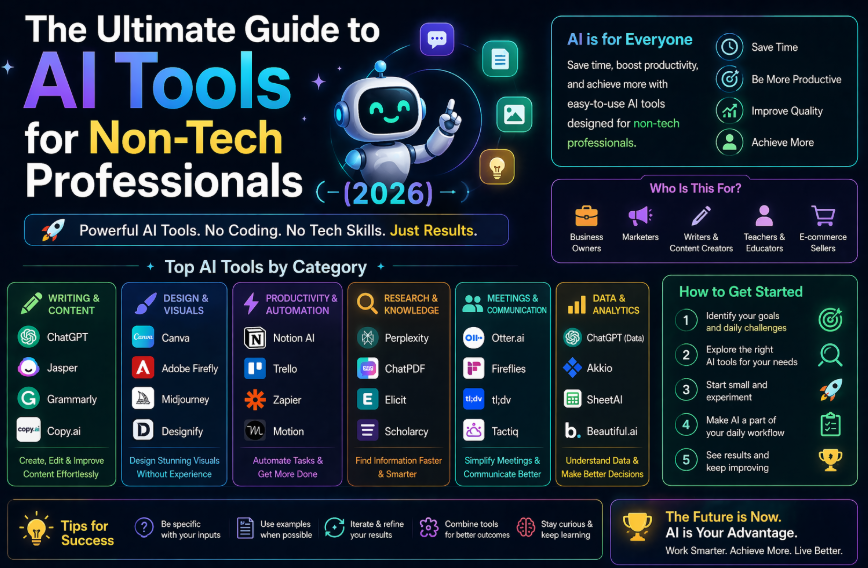
The Ultimate Guide to AI Tools for Non-Tech Professionals (2026)
Artificial intelligence has stopped being something IT departments worry about and started being something every professional needs to understand. In 2026, AI literacy is becoming as expected as basic computer skills were in 2005. You don’t need to know how it works under the hood — but you do need to know how to use it.
This guide is for professionals who want to use AI tools to work better, not learn to code or get a computer science degree. It covers everything from the basics to the practical tools to the mistakes most people make — all without assuming any technical background.
Part 1: What AI Tools Actually Are (And Aren’t)
What they are
Modern AI tools — particularly the ones covered in this guide — are software applications that can read, write, analyze, and reason about information in natural language. You communicate with them the same way you’d communicate with a knowledgeable assistant: by writing or speaking to them.
They’re good at:
- Generating text (writing, summarizing, translating, editing)
- Answering questions and explaining concepts
- Analyzing documents and extracting information
- Helping with decisions by presenting options and trade-offs
- Automating repetitive text-based tasks
What they aren’t
AI tools are not magic and not infallible. They can produce confident-sounding wrong answers (called “hallucinations”). They don’t know your specific context unless you tell them. They make judgment calls that you should always review, especially for anything consequential.
Think of them as an extremely capable junior assistant: genuinely useful, works fast, needs supervision on anything important.
The Three Types of AI Tools You Need to Know
Conversational AI (Chatbots): ChatGPT, Claude, Gemini — you have a conversation, they respond. The most flexible and widely applicable category.
Specialized AI Tools: Tools built for specific tasks — Grammarly for writing, Descript for video editing, Jasper for marketing content. More limited in scope but often higher quality for their specific purpose.
Automation AI: Tools like Zapier that connect AI capabilities to your existing apps and workflows. The plumbing that makes everything work together.
Part 2: The Essential AI Tools by Profession
For Writers and Content Creators
- Claude — best for long-form writing, editing, voice-consistent content
- ChatGPT — versatile, best all-purpose writing assistant
- Grammarly — polish, grammar, tone consistency
- Jasper AI — marketing-specific content at scale
For Business Professionals (Managers, Consultants, Analysts)
- ChatGPT or Claude — analysis, reports, presentations, email
- Notion AI — knowledge base, meeting notes, project docs
- Gemini — research, Google Workspace integration
- Zapier — automating business processes
For HR and People Professionals
- Claude or ChatGPT — job descriptions, policies, performance reviews
- Leena AI — employee self-service automation
- Lattice AI — performance management
- Notion AI — HR documentation and SOPs
For Educators and Teachers
- MagicSchool AI — purpose-built for teachers, 80+ classroom tools
- Diffit — reading level adaptation
- ChatGPT — lesson plans, quiz generation
- Canva AI — visual materials
For Freelancers and Independent Professionals
- Claude — client work, writing, research
- Jasper or Copy.ai — specialized content
- Descript — audio and video editing
- Zapier — business automation
For Marketing Professionals
- ChatGPT or Claude — strategy, copy, analysis
- Jasper AI — content at scale
- Copy.ai — ad copy, email sequences
- Midjourney — visual concepts and ideation
Part 3: How to Start Using AI at Work (The Right Way)
Step 1: Pick One Tool and One Task
The most common mistake is trying to learn everything at once. Start with:
- One tool: ChatGPT (most accessible) or Claude (best for writing quality)
- One task: Pick your single most time-consuming repetitive task
Spend a week using AI for just that one thing before adding anything else.
Step 2: Learn to Prompt Well
The quality of what you get from an AI tool is almost entirely determined by the quality of your instructions. A few principles that make a dramatic difference:
Be specific about what you want. “Write an email” produces worse results than “Write a professional follow-up email to a client who hasn’t responded in 5 days about a pending proposal. Polite but slightly more assertive. Under 100 words.”
Assign a role. “You are a [specific expert]. [Your question].” gives you expert-level perspective rather than generic overview.
Specify the format. Tell it if you want bullet points, a table, a numbered list, flowing prose, or a specific word count.
Give examples. Show it something that’s similar to what you want, and ask for something “like this.”
Ask it to think first. For complex questions, add: “Before you answer, think through the key considerations.” The output quality improves significantly.
Step 3: Always Review Before Using
Never send AI-generated content to a client, customer, or stakeholder without reviewing it. The review doesn’t need to be lengthy — a 30-second read-through to check for errors, awkward phrasing, or anything that doesn’t sound like you. But that step matters.
Step 4: Build Your Prompt Library
When a prompt produces great results, save it. Within 4-6 weeks of regular use, you’ll have a personal collection of prompts that reliably produce excellent output for your most common tasks. This is one of the highest-leverage investments you can make.
Step 5: Gradually Expand
After 2-3 weeks of using AI for your first task, identify the next most time-consuming task and apply AI to that. Add one new use case every few weeks rather than trying to automate everything simultaneously.
Part 4: The Most Common Mistakes (And How to Avoid Them)
Mistake 1: Treating AI Output as Final
AI output is a starting point, not a finished product. The time savings come from having a solid first draft to work from — not from bypassing your judgment entirely.
Mistake 2: Not Giving Enough Context
“Write me a business proposal” produces generic results. “Write a business proposal for a 3-month branding project for a 50-person logistics company. Our agency specializes in B2B brands. The proposal should include: executive summary, scope of work, timeline, and investment. Professional but approachable tone.” produces something you can actually use.
The more relevant context you provide, the more useful the output.
Mistake 3: Using AI for the Wrong Tasks
AI is excellent at structured, language-based tasks. It’s not good at reading between the lines of human relationships, making nuanced ethical judgments, or tasks that require proprietary real-time data it doesn’t have access to.
Use AI to handle volume work. Keep judgment work for yourself.
Mistake 4: Sharing Sensitive Information
Be thoughtful about what you paste into AI tools. Customer PII, confidential business data, proprietary research — check your company’s AI usage policy before pasting sensitive information into a consumer AI product. Many organizations now have guidelines or approved tools for sensitive-data use cases.
Mistake 5: Stopping After One Bad Output
Every AI tool occasionally produces a poor result. The response is to refine the prompt, not abandon the tool. Bad output almost always reflects a prompt that was too vague, lacked context, or didn’t specify the format. Try again with more specific instructions.
Part 5: Free vs Paid — What’s Worth Paying For
Most AI tools have generous free tiers that are sufficient for getting started. Here’s when it’s worth upgrading:
ChatGPT Plus ($20/month): Worth it if you use ChatGPT daily. Faster responses, better models, higher usage limits.
Claude Pro ($20/month): Worth it for heavy document work, long-form content, or if you’re using AI for professional deliverables.
Notion AI ($10/month add-on): Worth it if you’re building any kind of knowledge base or documentation system.
Grammarly Pro ($12/month): Worth it for anyone producing professional written content regularly.
Zapier starter ($20/month): Worth it once you have at least 2-3 workflows running.
The rule of thumb: If a tool saves you more than its monthly cost in billable hours or equivalent value, it’s worth paying for. For most professionals using these tools consistently, the math is obvious.
Part 6: Where AI Is Heading in 2026 and Beyond
You don’t need to be a futurist to understand the direction AI is heading — just observe what’s happening now:
AI is getting better at longer context. The ability to process entire books, lengthy contracts, and massive datasets in a single conversation is improving rapidly. This is making AI useful for tasks that were impossible 18 months ago.
AI is getting better at following complex instructions. The gap between what you ask for and what you get is narrowing. Tools in 2026 are significantly more accurate at following multi-step, nuanced instructions than they were in 2024.
AI is integrating into every tool you use. Email clients, word processors, spreadsheets, CRMs, project management tools — AI is being embedded everywhere. The skill of knowing how to instruct AI well is becoming more valuable because it applies everywhere.
The professionals who build AI habits now will have a significant advantage in 2-3 years. Not because AI will “take jobs” — but because the people who’ve learned to work effectively with AI will be dramatically more productive than those who haven’t.
The Starting Line
If you take one thing from this guide, let it be this: start somewhere specific. Not “I’m going to use AI more” — that’s too vague. Instead:
“I’m going to use ChatGPT to write my next 3 client emails.”
Or: “I’m going to use MagicSchool AI to write next week’s lesson plans.”
Or: “I’m going to paste my next meeting notes into Claude and ask it to extract the action items.”
One specific task, one tool, one week. That’s all you need to begin.
Related Guides on HQTRICK.COM
- [How to Use ChatGPT to Write Emails 10x Faster]
- [Best Free AI Tools for Teachers in 2026]
- [AI Tools for HR Managers That Actually Save Time]
- [5 Claude AI Tricks Most People Don’t Know About]
- [ChatGPT vs Gemini vs Claude: Which AI is Best for Writers?]
- [How to Build a Daily Workflow with AI (No Coding Needed)]
- [Best AI Tools for Freelancers to Earn More in 2026]
- [AI Prompt Tricks That Get 10x Better Results from ChatGPT]
- [How to Replace 5 Hours of Work Daily Using Free AI Tools]