
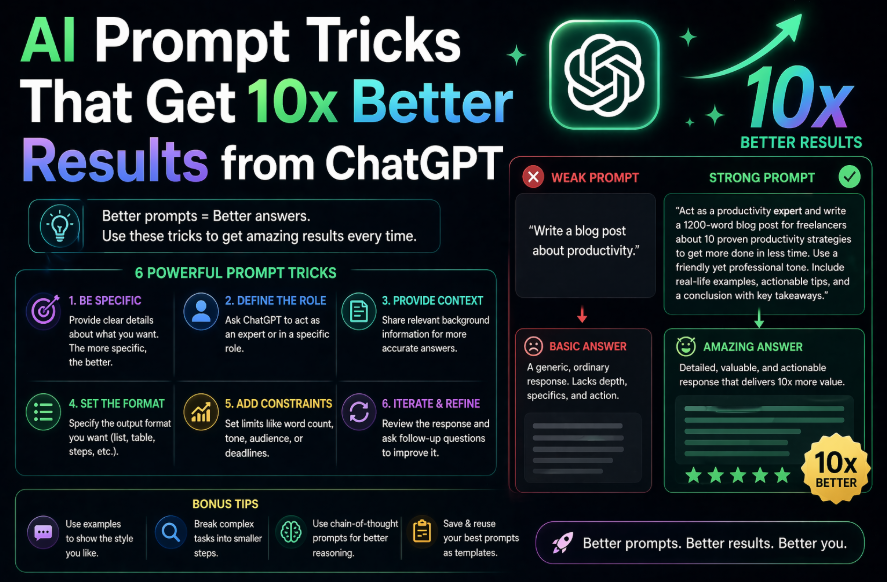
AI Prompt Tricks That Get 10x Better Results from ChatGPT
The difference between a mediocre ChatGPT response and an exceptional one almost never comes down to the AI. It comes down to the prompt.
Most people type a quick question the same way they’d type a Google search — and then wonder why the response feels generic. ChatGPT is not a search engine. It’s a conversation partner that responds to the quality of information and instruction you give it. Feed it better inputs, get dramatically better outputs.
These 12 tricks are the ones that make the most measurable difference in output quality. Each one comes with a copy-paste example so you can use it immediately.
Trick #1: Assign an Expert Role
Before asking your question, tell ChatGPT who it should be.
Without role: “What’s a good pricing strategy for my SaaS product?”
With role: “You are a SaaS pricing consultant who has worked with 50+ B2B software companies. What’s a good pricing strategy for a project management tool targeting 10-50 person teams? Consider both value-based and competitor-based approaches.”
The role primes ChatGPT to approach your question from a specific expert perspective rather than giving a generic overview.
Template: “You are a [specific expert with relevant experience]. [Your question].”
Trick #2: Specify the Output Format
ChatGPT will decide the format for you if you don’t specify — and it doesn’t always choose well. Being explicit gets you exactly what you need.
Examples of format instructions:
- “Give me a bulleted list of 10 items, no explanations”
- “Write this as a table with columns: [X], [Y], [Z]”
- “Format this as a step-by-step guide with numbered steps and a brief explanation for each”
- “Give me 3 options ranked from most conservative to most aggressive”
- “Write this as a 200-word executive summary”
Template: “[Your request]. Format the response as [specific format].”
Trick #3: Tell It Who the Audience Is
The same information communicated to a 10-year-old and to a PhD researcher looks completely different. Specifying your audience calibrates the language, depth, and assumed knowledge level.
Examples:
- “Explain this to a non-technical marketing manager”
- “Write this for a senior executive who has 3 minutes to read it”
- “Explain this as if I’m a first-year medical student”
- “Write this for a skeptical audience who will push back on every claim”
Template: “[Your request]. The audience is [specific description].”
Trick #4: Use “Before You Answer”
This is one of the highest-impact tricks for complex questions. Adding this instruction tells ChatGPT to reason through the problem before committing to an answer — producing more thorough, better-considered responses.
Example: “Before you answer, think through the key factors involved, potential trade-offs, and anything that might make this more complicated than it appears. Then give me your recommendation: Should I hire a full-time employee or a contractor for this 6-month project?”
Works especially well for: decisions, strategy questions, analysis tasks, anything with meaningful trade-offs.
Trick #5: Give a Concrete Example of What You Want
Showing ChatGPT an example of the output you’re looking for is dramatically more effective than describing it. This is called “few-shot prompting” and it works.
Template: “Write a subject line for a re-engagement email campaign. Here’s an example of the style I’m looking for: ‘We miss you — here’s 20% off to come back.’ Write 10 more in this style but with different emotional hooks.”
You can use this for: email subject lines, headlines, social posts, code patterns, writing styles, tone matching.
Trick #6: Constraint-Based Prompting
Constraints force better creative thinking — from ChatGPT and from humans. Adding specific constraints produces more focused, useful output.
Examples of useful constraints:
- “Under 100 words”
- “No bullet points — write in flowing prose only”
- “Only use free tools”
- “Assume I have zero technical knowledge”
- “Don’t include any advice about [X topic] — I’ve already decided on that”
- “No corporate jargon or clichés”
Template: “[Your request]. Constraints: [list your constraints].”
Trick #7: Ask for Multiple Options
Don’t settle for ChatGPT’s first answer. Asking for multiple variations gives you more to work with and often produces at least one option that’s significantly better than the others.
Template: “Give me 5 different versions of [X], each with a different [tone / approach / angle]. Label each one.”
This works for: headlines, email subject lines, product descriptions, taglines, introductions, approaches to a problem, call-to-action copy.
Trick #8: The “Improve This” Instruction
If you have a rough draft of something, this is often faster than starting from scratch:
“Here is my draft. Improve it by making it more [concise / persuasive / clear / professional / engaging]. Keep my core message intact but make it significantly better: [paste your draft]”
Works for: emails, proposals, social posts, articles, reports, presentations.
Bonus version: “What are the 3 weakest parts of this draft and how would you improve them? [paste draft]”
Trick #9: Chain Multi-Step Tasks
For complex outputs, break the task into steps and have ChatGPT complete them in sequence. This prevents the common problem of ChatGPT rushing to a final answer without the intermediate thinking that makes it good.
Template: “I want to [goal]. Let’s work through this in steps: Step 1: [First task] Step 2: [Second task, based on Step 1] Step 3: [Final output, based on Steps 1 and 2] Start with Step 1.”
Trick #10: Ask ChatGPT What It Needs
Sometimes the most efficient thing is to ask ChatGPT what information it would need to give you the best possible answer.
Template: “I want you to help me [task]. Before you start, tell me: what information would you need from me to give the most useful and specific response possible?”
This works especially well for: business advice, strategy questions, technical decisions, anything where context matters a lot.
Trick #11: The Devil’s Advocate Technique
After ChatGPT gives you an answer or recommendation, push back deliberately:
“Now play devil’s advocate. What are the strongest arguments against what you just said? What would a smart critic say?”
This surfaces counterarguments, risks, and blind spots that ChatGPT may have underweighted in its initial response. Invaluable before making important decisions based on AI advice.
Trick #12: Save and Reuse Your Best Prompts
Your best-performing prompts are assets. Start a simple document — in Notion, Google Docs, or anywhere — where you save prompts that produced excellent results. Within a month, you’ll have a personal library of 20-30 prompts that reliably produce great outputs for your specific use cases.
Bonus: With ChatGPT’s Custom Instructions feature (or Claude’s Projects), you can set standing instructions that apply to every conversation — so you don’t have to repeat your role, preferences, or context every session.
Quick Reference Table
| Trick | What It Does | When to Use |
|---|---|---|
| Assign a role | Shapes expertise and perspective | Any serious question |
| Specify format | Controls output structure | Always |
| Define the audience | Calibrates language and depth | Writing and explanations |
| “Before you answer” | Forces deeper reasoning | Complex decisions |
| Give an example | Shows exact style/format wanted | Creative tasks |
| Add constraints | Focuses and sharpens output | When defaults are too broad |
| Ask for 5 versions | More options, better selection | Headlines, copy, ideas |
| “Improve this” | Upgrades existing drafts | Editing tasks |
| Chain steps | Better multi-step outputs | Strategy, planning |
| Ask what it needs | Surfaces missing context | Complex advice requests |
| Devil’s advocate | Finds weaknesses and risks | Decisions, strategy |
| Save prompts | Builds reusable toolkit | Ongoing efficiency |
The Most Important Principle
Every one of these tricks comes down to the same underlying idea: ChatGPT responds to the quality of context and instruction you provide.
Think of a prompt as a brief to a very capable but new employee. The more clearly you define the role, the audience, the format, the constraints, and the goal — the better the work you get back. Vague brief, vague output. Precise brief, precise output.
Start with one trick. The role assignment (Trick #1) and format specification (Trick #2) are the easiest to implement and have immediate impact. Add more as they become second nature.
Want to see these techniques in action? Read: [5 Claude AI Tricks Most People Don’t Know About] — many of these prompt techniques apply across all AI tools.
Related Guides on HQTRICK.COM
- [How to Use ChatGPT to Write Emails 10x Faster]
- [Best Free AI Tools for Teachers in 2026]
- [AI Tools for HR Managers That Actually Save Time]
- [5 Claude AI Tricks Most People Don’t Know About]
- [ChatGPT vs Gemini vs Claude: Which AI is Best for Writers?]
- [How to Build a Daily Workflow with AI (No Coding Needed)]
- [Best AI Tools for Freelancers to Earn More in 2026]
- [AI Prompt Tricks That Get 10x Better Results from ChatGPT]
- [How to Replace 5 Hours of Work Daily Using Free AI Tools]