
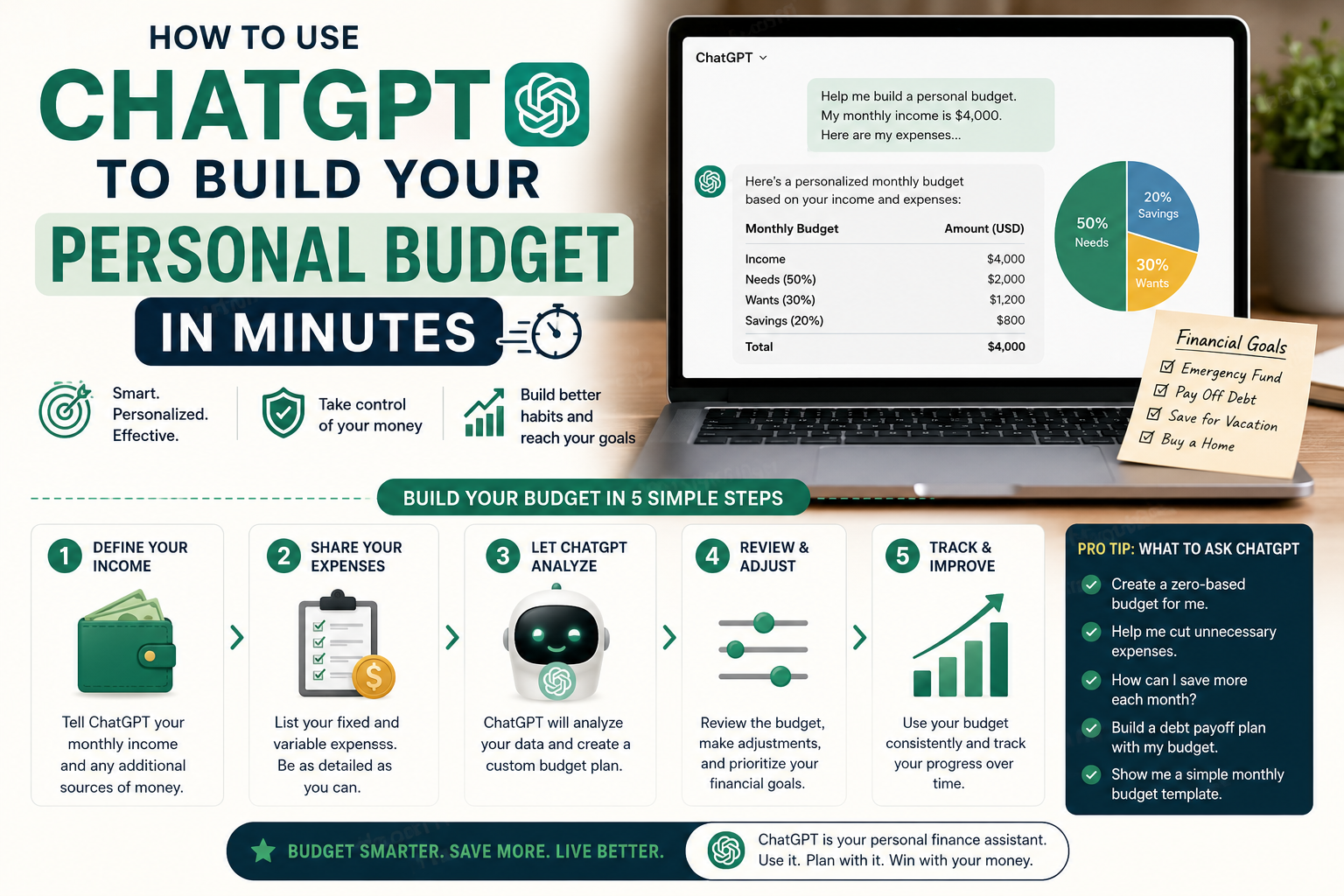
How to Use ChatGPT to Build Your Personal Budget in Minutes
Building a budget manually takes most people 2–3 hours of staring at bank statements, doing math, and second-guessing categories. ChatGPT can cut that to under 10 minutes — and often produces a more thoughtful result than people create on their own.
This guide shows you exactly how to use ChatGPT for your personal budget: what to give it, which prompts to use, and how to turn the AI output into a system you’ll actually maintain.
What ChatGPT Can Do for Your Budget
ChatGPT can’t see your bank accounts or credit cards (unless you connect it through a third-party app). But it can do something equally valuable: help you think clearly, structure your numbers, and build a personalized plan when you give it your data.
Specifically, it can:
- Analyze your spending data and identify patterns
- Build a customized budget based on your income and expenses
- Suggest specific cuts based on your priorities
- Create a debt payoff timeline from your numbers
- Generate weekly check-in templates
- Answer financial questions in plain language without judgment
Step 1: Gather Your Numbers First (10 Minutes)
Before you open ChatGPT, collect:
- Your monthly take-home income (after tax)
- Average monthly spending by category (3-month average from bank/card statements)
- All debts: balances, interest rates, minimum payments
- Current savings balance
- Any financial goals (save for house, pay off debt, build emergency fund)
The more specific your input, the more specific and useful ChatGPT’s output.
Step 2: The Budget Builder Prompt
Paste this into ChatGPT — fill in every bracket with your real numbers:
“I want to build a realistic personal budget. Here’s my financial situation:
Monthly take-home income: $[amount]
Current monthly spending (approximate): – Rent/mortgage: $[amount] – Utilities: $[amount] – Groceries: $[amount] – Eating out: $[amount] – Transport: $[amount] – Subscriptions: $[amount] – Entertainment: $[amount] – Personal care: $[amount] – Other: $[amount]
Debts: [list each debt with balance, interest rate, minimum payment]
Current savings: $[amount] Financial goals: [e.g., build $10,000 emergency fund, pay off credit card in 12 months]
Please: 1. Analyze where I currently stand 2. Build a realistic monthly budget that works toward my goals 3. Identify the top 3 areas where I should cut spending and by how much 4. Create a 12-month roadmap showing when I’ll hit my goals at this rate 5. Suggest what I should automate immediately”
Step 3: Review and Refine
ChatGPT’s first output is a starting point. Follow up with specific questions:
“Is my rent-to-income ratio healthy? What’s the recommended percentage?”
“What if I cut dining out by $200 and put that toward debt — how much faster would I pay it off?”
“I have an irregular income — some months I earn $500 more or less than average. How should I adjust my budget for that?”
“What’s the right order to prioritize: emergency fund vs. debt payoff vs. investing?”
Each follow-up refines the plan to your specific situation. This is where AI genuinely outperforms a static spreadsheet template — it adapts to your questions in real time.
Step 4: Build Your Weekly Check-In Template
Ask ChatGPT to create a template for your ongoing budget reviews:
“Create a simple weekly budget check-in template I can fill in every Sunday. It should take under 10 minutes and cover: spending progress by category, any budget variances, upcoming expenses this week, and one financial action to take. Make it feel approachable, not stressful.”
Use the template in Notion, Google Docs, or print it. The 10-minute Sunday check-in is what separates people who maintain their budgets from people who abandon them.
Step 5: Use AI for Ongoing Money Questions
Once your budget is built, ChatGPT becomes your on-demand financial thinking partner. Questions it handles well:
Scenario planning: “I’m considering taking a $3,000 vacation in 8 months. What do I need to save monthly, and what does that do to my other goals?”
Purchase decisions: “Is it smarter to pay cash for a $8,000 car or finance it at 6.9% APR and keep the cash liquid?”
Tax planning basics: “I’m self-employed — what expenses should I be tracking for tax deductions?”
Negotiation prep: “I want to ask for a $15,000 raise. How should I frame this conversation and what market data should I reference?”
Important: ChatGPT is not a licensed financial advisor. For complex tax questions, investment decisions, or estate planning, consult a qualified professional. For everyday budgeting and financial thinking, it’s genuinely useful.
Even Better: Notion AI for Budget Tracking
If you use Notion, adding the Notion AI add-on ($10/month) lets you build a living budget database that you can query in plain language:
- “How much did I spend on restaurants in March?”
- “Which months did I go over budget on groceries?”
- “What’s my savings rate over the last 6 months?”
Combined with ChatGPT for planning and Notion AI for tracking, you have an AI-powered financial system that previously would have required expensive software or a financial advisor.
The AI Budget vs. Traditional Methods
| Method | Setup time | Personalization | Ongoing effort | Cost |
|---|---|---|---|---|
| ChatGPT | 10 min | High | Low | Free |
| YNAB | 2–3 hours | High | Medium | $15/month |
| Spreadsheet | 1–2 hours | Medium | Medium | Free |
| Financial advisor | Multiple sessions | Very high | Low | $200–500/hr |
| No budget | 0 min | None | 0 | High (hidden) |
For most people starting their budgeting journey, ChatGPT + a simple spreadsheet is the highest ROI starting point.
The One Prompt to Save
If you only save one thing from this guide, save this prompt and fill it in with your numbers:
“Act as my personal financial coach. My monthly take-home is $[X]. My biggest financial goal is [goal]. My main financial challenge is [challenge]. Give me one specific, actionable thing I can do this week to move toward my goal. Be direct and specific — not generic advice.”
Run this weekly. The answers accumulate into a meaningful financial practice over time.